
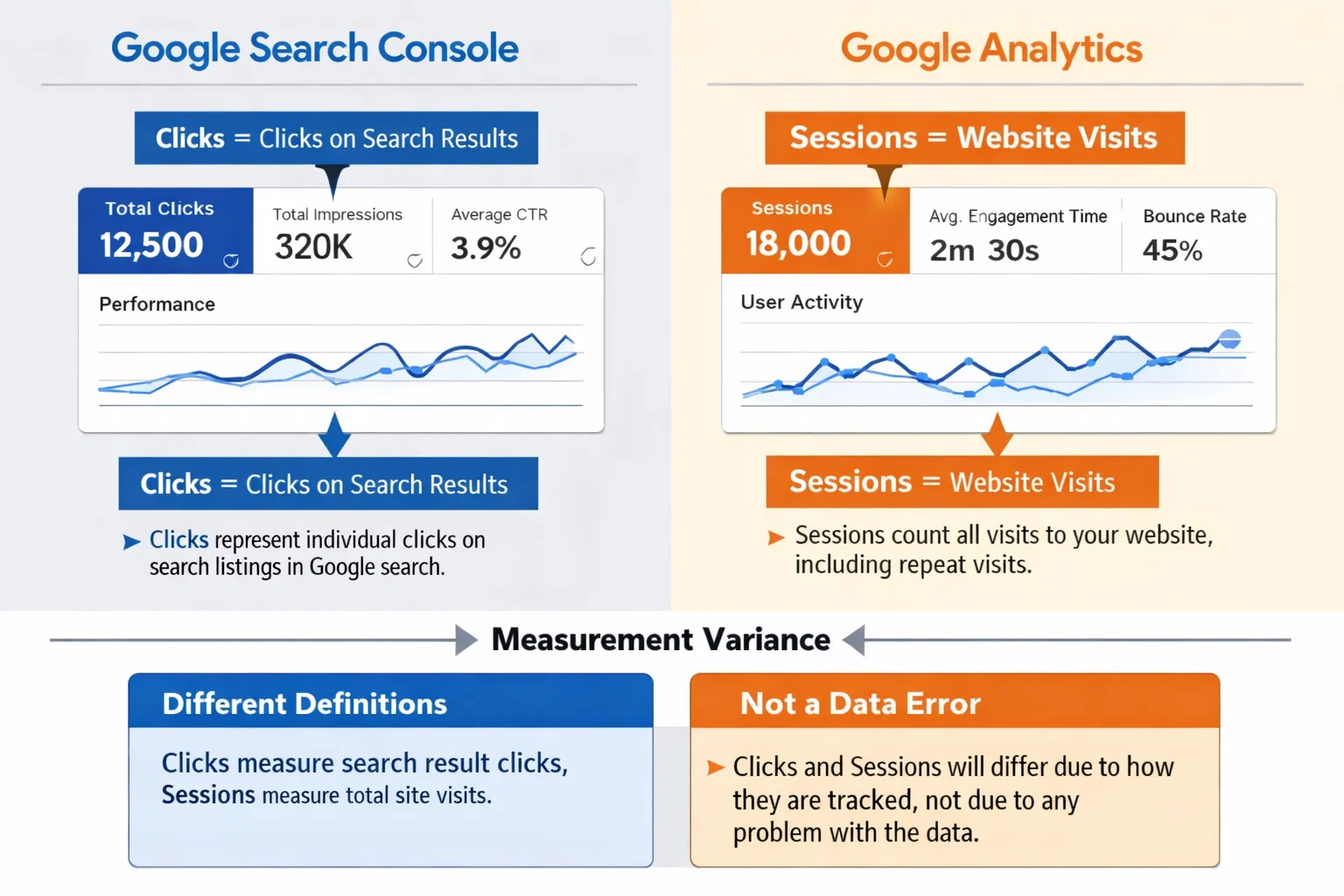
Google Search Console clicks measure how many times users click your site from Google search results, while Google Analytics sessions track visits that are successfully recorded on your website. The numbers don’t match because they are measured differently and affected by tracking, cookies, and user behavior.
Key Takeaways
- ✔ Google Search Console clicks and Google Analytics sessions track different metrics
- ✔ A click from Google search does not always create a session
- ✔ Cookie consent, ad blockers, and tracking issues affect Analytics data
- ✔ Search Console only tracks Google search traffic
- ✔ Both tools should be used together for accurate SEO analysis
What Is a Click in Google Search Console?
A click in Google Search Console is counted when a user clicks your website’s link from a Google search results page. It only measures interactions that happen directly within Google Search and does not depend on tracking codes or cookies.
Key points about Google Search Console clicks:
- Counted when a user clicks a result from Google Search
- Recorded even if Google Analytics tracking fails
- Only include Google organic search traffic
- Don’t track user behavior after the click
Because Search Console tracks data at the search results level, it often reports higher numbers than Google Analytics.
What Is a Session in Google Analytics?
A session in Google Analytics represents a visit to your website that is successfully tracked by the Analytics code. A session starts when a user lands on your site and ends after 30 minutes of inactivity or when certain conditions are met.
Important things to know about Google Analytics sessions:
- A session requires the Analytics tracking code to load
- Sessions can be blocked by cookie consent or ad blockers
- One user can generate multiple sessions
- Sessions include traffic from all sources, not just Google Search
Because sessions depend on tracking and user consent, they are often lower than Search Console clicks.
Why Google Search Console Clicks and Google Analytics Sessions Don’t Match
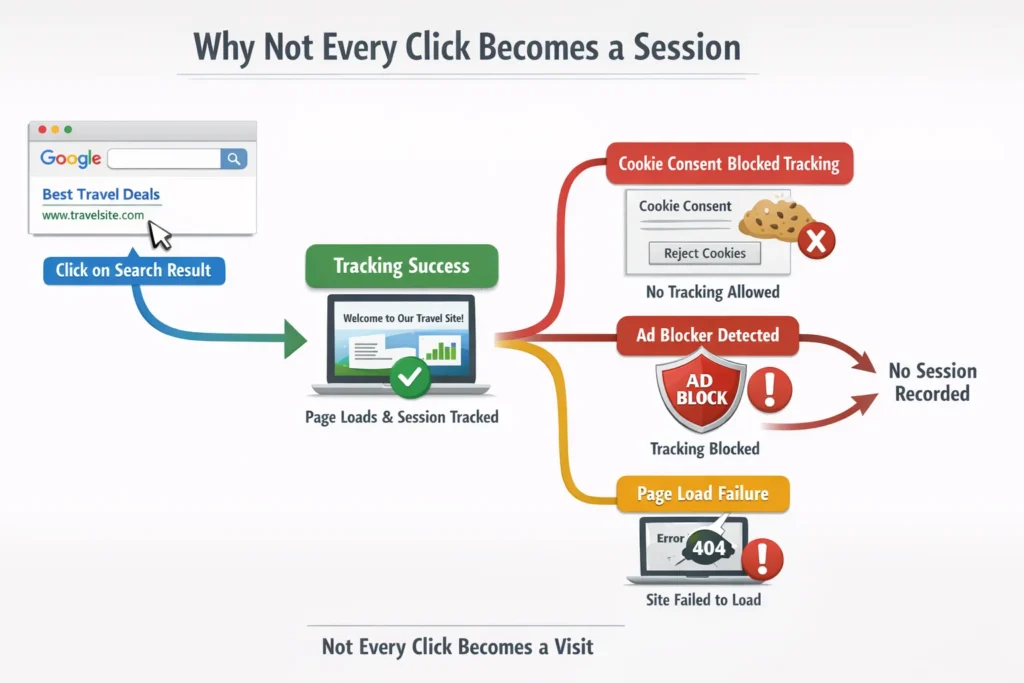
| Scenario | What Happens in Google Search Console | What Happens in Google Analytics | Why the Numbers Differ |
| User clicks your site in Google search | Click is counted immediately | Session is only counted if tracking loads | GSC counts the click even if Analytics tracking fails |
| User blocks cookies or tracking | Click is still counted | Session may not be recorded | Analytics depends on cookies and consent |
| Page fails to fully load | Click is counted | Session is not created | Analytics code never executes |
| User clicks multiple times from Google | Each click is counted | Often counted as one session | Multiple clicks can lead to a single session |
| User leaves instantly (bounce) | Click is still counted | Session may end quickly or not record events | GSC only measures the click, not behavior |
| Ad blocker is enabled | Click is counted | Session may be blocked | Ad blockers often stop Analytics scripts |
| Consent banner is declined | Click is counted | Session is not tracked | GDPR consent affects Analytics, not GSC |
Which Metric Should You Trust for SEO Reporting?
Neither Google Search Console clicks nor Google Analytics sessions are “wrong.” They serve different purposes and should be used together for accurate SEO reporting.
Use Google Search Console clicks when you want to:
- Measure organic search visibility.
- Track keyword and page performance in Google Search.
- Understand search demand and ranking impact.
Use Google Analytics sessions when you want to:
- Analyze on-site user behavior.
- Track engagement, conversions, and goals.
- Understand how visitors interact with your website.
Best Practice: How to Use Google Search Console and Google Analytics Together
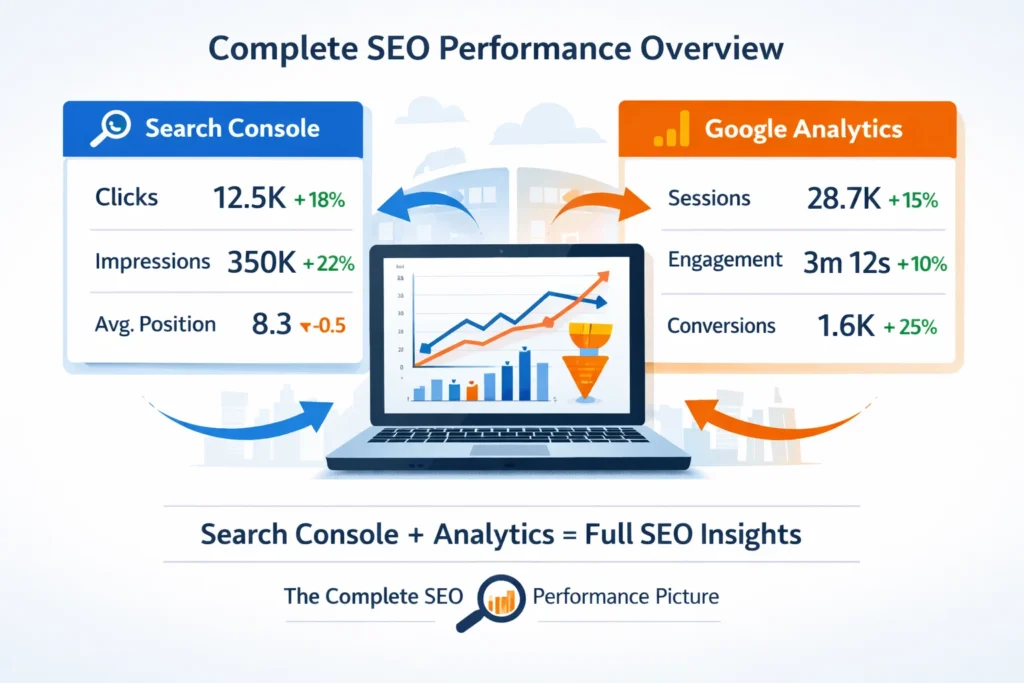
Google Search Console and Google Analytics answer different SEO questions. When used together, they help you understand both search visibility and user behavior, which is essential for accurate analysis and reporting.
Use Google Search Console for Search Performance
Search Console should be your primary tool for understanding how your site performs before users arrive:
- Track which keywords generate clicks and impressions
- Monitor average positions and visibility changes
- Identify pages gaining or losing organic traction
- Detect technical issues affecting search performance
This data reflects search intent and demand, not on-site behavior.
Use Google Analytics for On-Site Behavior
Google Analytics should be used to analyze what happens after the click:
- Measure sessions, engagement, and bounce rates
- Track conversions and user journeys
- Understand traffic quality across devices and locations
- Identify drop-offs caused by UX or performance issues
This data depends on tracking and consent, which explains why sessions may be lower than clicks.
How to Connect Insights from Both Tools
The real value comes from comparing patterns, not numbers:
- High clicks + low sessions → tracking or consent issue
- High sessions + low engagement → content or UX problem
- Rising clicks + stable sessions → growing visibility but limited retention
Always compare trends over time, not exact counts.
SEO Reporting Best Practice
For clear SEO reporting:
- Use Search Console as the source of truth for SEO visibility
- Use Analytics as the source of truth for user behavior
- Explain discrepancies proactively to clients or stakeholders
This approach avoids confusion and leads to better SEO decisions.
SEO Portfolio Highlight: Organic Baby Food Ecommerce Website
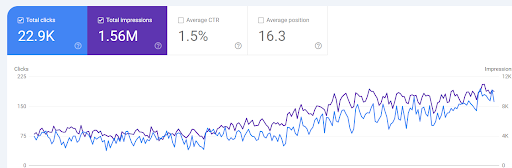
For an organic baby food eCommerce website, a data-driven SEO strategy was implemented to scale organic visibility and traffic in a competitive product-based niche.
SEO results achieved:
- 22,900+ organic clicks
- 1.56M+ search impressions
- 1.5% average CTR
- Average position improved to 16.3
- Steady, long-term upward growth trend in Google Search Console
The growth was driven by intent-based keyword optimization, category and product page SEO, improved internal linking, and continuous performance analysis to capture high-intent search demand.
Want similar eCommerce SEO results in the USA? Partner with an experienced SEO Specialist USA to grow visibility, traffic, and revenue organically.
Get Audit TodayFAQs: Google Search Console Clicks vs Google Analytics Sessions
Why are Google Search Console clicks higher than Google Analytics sessions?
Search Console counts every click from Google search results, while Analytics only records sessions if tracking loads successfully. Cookie consent, ad blockers, or page load issues can prevent sessions from being recorded.
Can Google Analytics sessions ever be higher than Search Console clicks?
Yes. Google Analytics includes traffic from all sources such as direct, referral, paid, and social traffic, while Search Console only tracks Google organic search clicks.
Which metric is more accurate for SEO reporting?
Both are accurate for different purposes. Search Console clicks are more reliable for measuring SEO visibility and search performance, while Analytics sessions are better for analyzing on-site behavior and conversions.
Do cookie consent banners affect Google Analytics sessions?
Yes. If users decline cookies, Google Analytics may not track their visit, reducing session counts. Google Search Console clicks are not affected by cookie consent.
Does one Google Search Console click always create a session?
No. A click only creates a session if the Analytics tracking code loads correctly and the user allows tracking. Otherwise, the click is recorded in Search Console but not in Analytics.
Does Google Search Console track user behavior after the click?
No. Google Search Console only tracks what happens in Google search results. It does not measure time on site, pages viewed, or conversions.
Should SEO reports compare clicks and sessions directly?
No. Exact numbers should not be compared. Instead, compare trends over time and use each metric for its intended purpose to avoid misleading conclusions.
How should SEO professionals explain this difference to clients?
Explain that Search Console measures search demand and intent, while Analytics measures tracked visits and behavior. Using both together provides a complete and accurate SEO performance picture.
Discover More Guides with SEO Specialist USA